|
Bob Perry |
||||||||||||||||||||||||||||||||||||||||||||||||||||||||||||||||||||||||||||||||||||||
|
IEEE 1394 vs. DVI |
||||||||||||||||||||||||||||||||||||||||||||||||||||||||||||||||||||||||||||||||||||||
|
Currently there are three digital interface standards:
Plugging It All Together! We are in the midst of a gigantic transition of our country's infrastructure - the shift from analog to digital television. And as all of us are aware, digital television opens a new world of high resolution images, superb audio, and a variety of new digital services yet to come. A visit to your local professional A/V retailer reveals the vast variety of products that deliver this new technology to your living room. Looming before the unwary consumer is a decision that will ensure the fulfillment of their digital yearnings, or total frustration. Two digital interfaces (IEEE 1394 and DVI) and one analog interface (component video) introduced to the marketplace each vie for leadership, and each have their own challenges and opportunities. We will review each technology
and its associated issues to better help you understand and make your
purchase decisions It has to be compressed in order for the large signal to be transmitted This is very much like today's
Digital Broadcast Satellite (DBS) systems, where the programming is
transported directly to the home as a compressed digital stream, or
today's digital cable systems, or even DVD [MPEG-2], where the compressed
digital bit stream is stored on a disk for playback in the home. The
following diagram details the simplified process of acquiring a digital
video signal and displaying it. Some technical details need to be understood First, there is no qualitative difference between the signal quality of the broadcast signal and the compressed digital bit stream on the IEEE 1394 connection. They are technically identical. There is also no qualitative difference between the DVI and analog video output-they can both be full HD quality signals without degradation. At some stage most displays need to receive an analog video signal - the difference between DVI and analog video in the graphic is the location of the digital-to-analog (D/A) conversion. With
DVI,
the D/A conversion usually takes place in the display.
The analog video output shown in
the graphic is the normal configuration of an external digital set-top-box
that receives digital broadcasts, and outputs analog video to the display. However, this tends to be a moot point, since the maximum length of a DVI cable is 3 meters. A properly shielded component video cable should not pickup noticeable interference or noise, at even 4 to 5 meters. Now that we have a basis for understanding the differences between the three primary connections - IEEE 1394 serial connections, DVI digital video connections, and analog video connections, we can discuss each in detail
IEEE 1394,
also known as FireWire, and i.Link (Sony's name) was invented by the
scientists at Apple
Computer in the 1980s. They were searching for a digital
connection to support networking and the transfer of large serial
streams of audio and video. FireWire, the name used by
Apple to
describe this connection, is a marvel of technology. Key to this recipe is the way the data is managed and transferred across the connection First and foremost it is a
serial connection. Unlike LAN technology, which creates packets of data,
throws them across the network connection, and then reassembles them in the
proper order,
IEEE 1394
can also send the data
serially, in a sequential stream of packets. Imagine a movie chopped into
data blocks, then thrown across a network connection for reassembly. It's no
wonder that streaming a movie from the Internet (which uses the TCP/IP
protocol) is an experience to be avoided. Many have suggested that Internet
video streaming should be more appropriately titled "stuttering." On the
other hand, a movie sent serially arrives in the proper order and without
delay. Audio/ video products generally just send MPEG-2 type A/V streams. Both categories of products, when sending A/V streams, can also send the control protocols that are part of the IEEE 1394 standard known as AVC - Audio Video Control. Using this control protocol, one device can control another. There is an optional higher-level software protocol that builds on AVC, which is known as HAVi (Home Audio Video interoperability). Another unique characteristic of IEEE 1394 is that it is a self-recognizing and self-configuring connection Simply put, when you connect two
IEEE 1394
A/V products together, they send each other some data automatically, that
essentially states "this is who I am, this is what I do, and this is how you
control me". So each product connected together with
IEEE 1394
is aware of all the other products, what they do, and how to control them.
How does this work in the real world? The following shows the actual
function of a
IEEE 1394
product: No consumer configuration is
necessary, no drivers load like on a PC - just connect and it works. The
TV automatically recognized the D-VHS, learned its control codes, and
created an on-screen icon for it. Now, using the TV remote I can just select
the D-VHS icon and the menu for the device is created by the TV - using the
control codes that were downloaded by the TV from the D-VHS. And, each TV is able to use the D-VHS HD VCR and other devices on the IEEE 1394 network Product designers can create their user interfaces (the on-screen control systems) for their products in any manner. Each product's control interface can be unique, but under the IEEE 1394 standard, it "hooks" to the underlying AVC and HAVi (if so-equipped) control signals. But unlike uncompressed video
interfaces such as
DVI
and analog video,
IEEE 1394
uses a different system for creating the on-screen displays and menus. The
IEEE 1394
standard provides for onscreen graphics by using a system known as
Level II User Interface. Level II User Interface is specified in the
European cable box standard known as MHP (Multimedia Home Platform),
and in the U.S. it is specified in the
CableLabs OCAP cable box standard as well. This is a key difference between uncompressed connections such as DVI and RGB/ component video These uncompressed connections cannot be recorded by any known consumer recording technology, and the copy protection system on DVI (known as HDCP -High Definition Copy Protection) forbids all copying - it also forbids providing a DVI input on a recording device. The
IEEE 1394
connection has DTCP (Digital Transmission Content Protection) developed by
the Digital Transmission Licensing Administrator LCC (LTLA or 5C companies)
copy protection, which has encoding rules. (1)
These encoding rules restrict content creators from
blocking the recording of content that has normally been
recordable in the analog era.
The connector itself has several
versions -
DVI-A
which supports normal analog signals,
DVI-D
which supports the digital signals, and the combined connector, which
supports both signals simultaneously. As you can see from the graphic detailing the process of receiving a digital broadcast, the compressed broadcast signal is decompressed into a digital video signal, and then output as DVI for input into the display. So why change from these existing analog connections to DVI-based connections? The primary driver is the content community. Because the analog HD signals do not contain any copy protection capability, the content community is afraid that these HD-grade signals may be stolen and transmitted across the Internet in the future This kind of distribution would play havoc on the content community's business model of releasing content into different worldwide markets at different intervals to maximize revenue. Because DVI is uncompressed, it cannot be recorded by any known consumer recording technology. And with the application of HDCP copy protection, the connector cannot be installed on any recording device as an input. So the content community believes that DVI is secure, and immune from any copying Another comment cited by manufacturers regarding DVI versus IEEE 1394 is the ease of creating complex on-screen graphics and menus. Creating these menus and graphics is roughly the same process for DVI as it is for today's analog connected products - the graphics processor in the product just includes the graphics with the uncompressed program video for display. There is no question that using
IEEE 1394
requires a different approach as was noted above. Keeping in mind that the
IEEE 1394
has compressed content streams, menu graphics cannot simply be
overlaid on the compressed video stream. Although the approach is different,
the cost and outcomes are comparable. For example, RGB (red, green, and blue) has several variations, based on how the synchronization pulses are sent. There is RGB with individual sync for each color, there is sync on green (the sync pulse is in the green video signal), and there is RGBHV, where separate horizontal and vertical sync pulses are on their own wires.
Interestingly, today the
YPrPb color difference signal type is referred to as component video, and
RGB is commonly thought of as not being a component video signal.
This is technically incorrect, but is
common practice. The analog connection between HD
source components and displays is referred to as the "analog hole" by
the content community, and they want to plug the hole. But today over 2.5
million consumer televisions use analog HD component video to connect to HD
sources, and audio/video manufacturers do not support phasing out support
for this interface over the short term, for fear of stranding early adopter
consumers. This desire stemmed from the concept that by denying or limiting home recording, consumers would order pay-per view and other content repeatedly, generating multiple fees and increasing revenue Because the consumer electronic
industry could not get support for
IEEE 1394
with 5C copy protection in the early years, we adopted the known and
accepted interface technology of the time - component video. Of course,
after component video became popular, a number of studios have
now accepted
IEEE 1394
and 5C. Pulling It All Together So in review, we have compressed interfaces, and uncompressed interfaces, each with their own individual capabilities and problems. Why is there such a debate over these interfaces? And why has this author publicly criticized DVI as being "bad for the consumer?" In order to better understand the issues, we need to review a concept known as "Content Encoded Output Switching" or "Selectable Output Control." The concept is simple. When a movie is created in digital form, the studio can inject a code that signals the set-top box-cable or satellite, to turn off certain outputs. So, if the IEEE 1394 interface can be shut off, the consumer cannot record, since the DVI and analog component video signals cannot be recorded as discussed earlier. The desire for this type of
output control is clearly stated in the public record, and in the
specifications issued by the cable industry's laboratories -
CableLabs. If the "good" movies and other programs cannot be networked, consumers cannot be expected to build A/V networks just to watch the "bad" stuff
I believe this disabling of
IEEE 1394
outputs is ill-conceived, and an affront to consumers' "Fair Use" home
recording rights. It is my opinion, and the opinion of many that we should respect the investments made by consumers, particularly the early who are helping to drive the HD transition, and not allow such a scheme to exist. (2) Many people have asked why the content community wants to stop home recording and networking There are two basic issues that concern them - networks that would allow transfer of compressed content to the Internet, and money. The ability to transfer a compressed two-hour HD movie to the Internet does not really exist today, although there are concerns it could in the future. This is because even with broadband, a compressed HD movie is a huge amount of data. For example, with a cable modem and the industry average upload speed of 384 kbps, a two-hour HD movie takes 129 hours to upload, which is not quite video-on-demand. And IEEE 1394 with 5C already protects against Internet retransmission. As for money, the content community argues it does not want to stop home recording, but just wants to control it.
Both the delivery system owners (cable and satellite), as well as the content community have a stake in this, since both of them share in the revenue chain for pay-per-view and other "per-play" systems.
And as you may be aware, both cable and satellite
digital set-top boxes have systems that use the cable or phone line to
automatically bill you for each service or movie you watch. And what is the impact if cable and satellite set-top boxes simply only have DVI outputs, and no IEEE 1394 connections to shut off? It's important to note that
in my opinion, there is
nothing inherently bad about
DVI.
It's just that
DVI
interfaces, combined with the ability to shut
off or not include other interfaces, locks the consumer into a world that
eventually replaces the "Play"
button with the "Pay" button. And each source device that receives a digital stream, or plays back a digital stream from a prerecorded source requires an expensive MPEG-2 decoder. In an IEEE 1394 environment, only one MPEG-2 decoder is needed - at the display. In 2002, an HD grade MPEG-2 decoder has a retail price impact from $700 to $1,200 depending on features. And
DVI
does not allow
the sharing of components throughout the home, nor the easy control of
devices that is supported in
IEEE 1394. These issues are also why my company, Mitsubishi, has decided not to support the D-Theater encryption feature for D-VHS HD VCRs. The long-term strategy of D-Theater is to output the signal via DVI, and there is no commitment to continued output on IEEE 1394 [or full-resolution analog component video - Editor-In-Chief]. We simply will not expose
consumers to the additional cost of the HD MPEG-2 decoder, and the risk of
having outputs turned off [or "downrez"
-
Editor-In-Chief Gary Reber] So if you are considering what products to purchase, this author recommends that you research and learn the tradeoffs to be the most informed buyer possible. And supplement this research with the knowledge and help of your local specialty A/V retailer. Important References For More
Detailed Information (1)
The "5C" companies, who developed the
DTCP
technology, are Hitachi Ltd. Intel Corp., Matsushita Electric Industrial Co.
(Panasonic), Sony Corp., and Toshiba Corp..
DTCP attaches
rules to a digital signal as it is being transmitted over a high-capacity
IEEE 1394
connection. Those rules can prevent a program from being recorded (termed
"Copy Never") or, once it has been recorded ("Copy Once"), from being
reproduced. The unhindered level of
DTCP is "Copy Freely."
About The Author Bob Perry is the Vice President of Marketing for Mitsubishi Digital Electronics America, Inc. (MDEA), and is responsible for the overall marketing function of the corporation, including product development, marketing communications, government relations, industry policy, public relations, national retailer training, and new technologies management. Bob has also taught economics,
computer science, and management at several colleges. He also spent 10 years
in the U.S. Army in military intelligence, communications, and engineering.
Bob holds a bachelor's degree in business administration from
Columbia College and
a master's degree in management from Webster University in St. Louis. Bob also serves as a director on the board of the Home Recording Rights Coalition, as well as a member of the steering committee. In addition, Bob is a director
of the Home Audio Video Interoperabilty (HAVi)
Corporation board. |
||||||||||||||||||||||||||||||||||||||||||||||||||||||||||||||||||||||||||||||||||||||
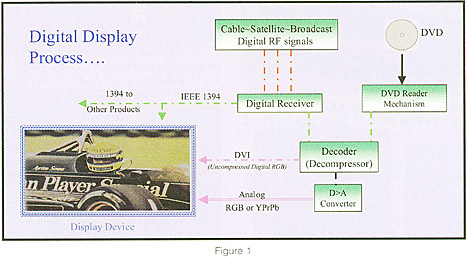 - As you can see
from Figure 1, the digital content, which is an MPEG-2-compressed
digital bit stream is either transmitted (over-the-air, on cable, or via
satellite) or it is read from a storage device such as a DVD.
- As you can see
from Figure 1, the digital content, which is an MPEG-2-compressed
digital bit stream is either transmitted (over-the-air, on cable, or via
satellite) or it is read from a storage device such as a DVD.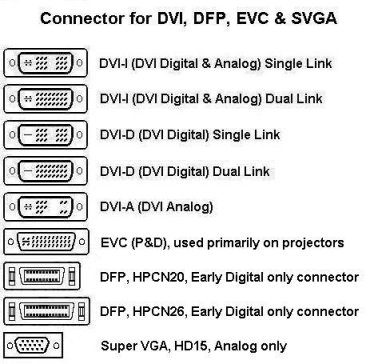
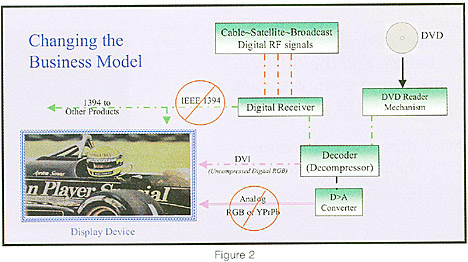 This would have a
dramatic chilling effect on the future of home networking in general,
because consumers need simple, powerful self-configuring network
technologies to have widespread home networking.
This would have a
dramatic chilling effect on the future of home networking in general,
because consumers need simple, powerful self-configuring network
technologies to have widespread home networking. 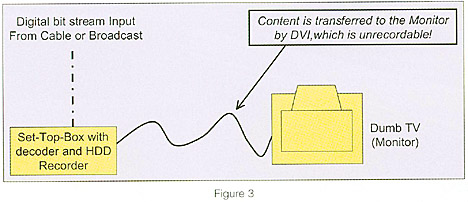 As you can see from
Figure 3, by eliminating the
As you can see from
Figure 3, by eliminating the
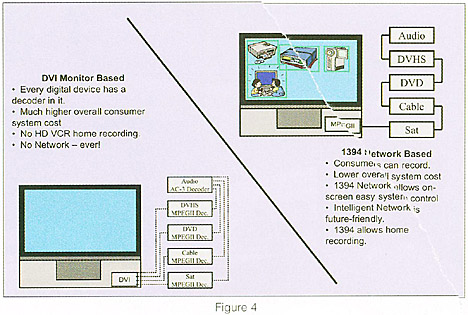 As you can see from
Figure 4, using
As you can see from
Figure 4, using